Order until 13:00 CET and we will ship today! One-day delivery across EU and UK
Order until 13:00 CET and we will ship today! One-day delivery across EU and UK
Order until 13:00 CET and we will ship today! One-day delivery across EU and UK

The LawMate RD-30 has been one of the most ordered items in our counter-surveillance equipment range for years, and customer feedback has always been positive: it is light, fits in a pocket, and performs very well as a first-choice option in this category.
It stays on our recommendation list, and plenty of customers who own far more expensive equipment still carry one.
As with every detector, it has its own limits; the useful question is not whether the RD-30 is good, but where its limits lie and whether your situation is above or below them.
A dual-function handheld: RF mode picks up active wireless transmissions in a room. Optical mode uses a small LED array and viewfinder to reveal the reflection from a camera lens, which works whether or not that camera is transmitting anything.
That second function is why the unit is listed as a hidden camera lens finder and RF detector rather than just a scanner.
Those four points are why we still recommend it as a first purchase, and why it stays in the bag long after people upgrade. It is the unit you carry when you do not expect to need one.
This is what decides whether you need anything else.
1. A camera more than five metres away
Optical detection works by returning a lens reflection to your eye, and the strength of that reflection falls off quickly with distance. With a modest LED array, the RD-30's practical optical range is roughly one to five metres.
In a hotel room or a small office, that is enough, provided you scan methodically and move around the space. In a boardroom, a conference suite or an open-plan floor, it is not. You end up too far from the wall for a reliable return.
2. Anything transmitting above 6 GHz
The RD-30 covers 20 MHz to 6 GHz. That includes 2.4 GHz Wi-Fi, Bluetooth, GSM, and most common covert transmitters, but not the higher microwave bands. Newer devices increasingly operate above 5.8 GHz for exactly that reason: fewer detectors look up there.
3. The difference between a threat and your own router
You get told a signal is present. You do not get told what kind.
In a room with a Wi-Fi router, a Bluetooth speaker, a smart TV and three phones, that matters. The reading is real, but nothing in it separates a covert transmitter from the neighbour's access point.
If your concern is hidden cameras, this is the upgrade that matters.
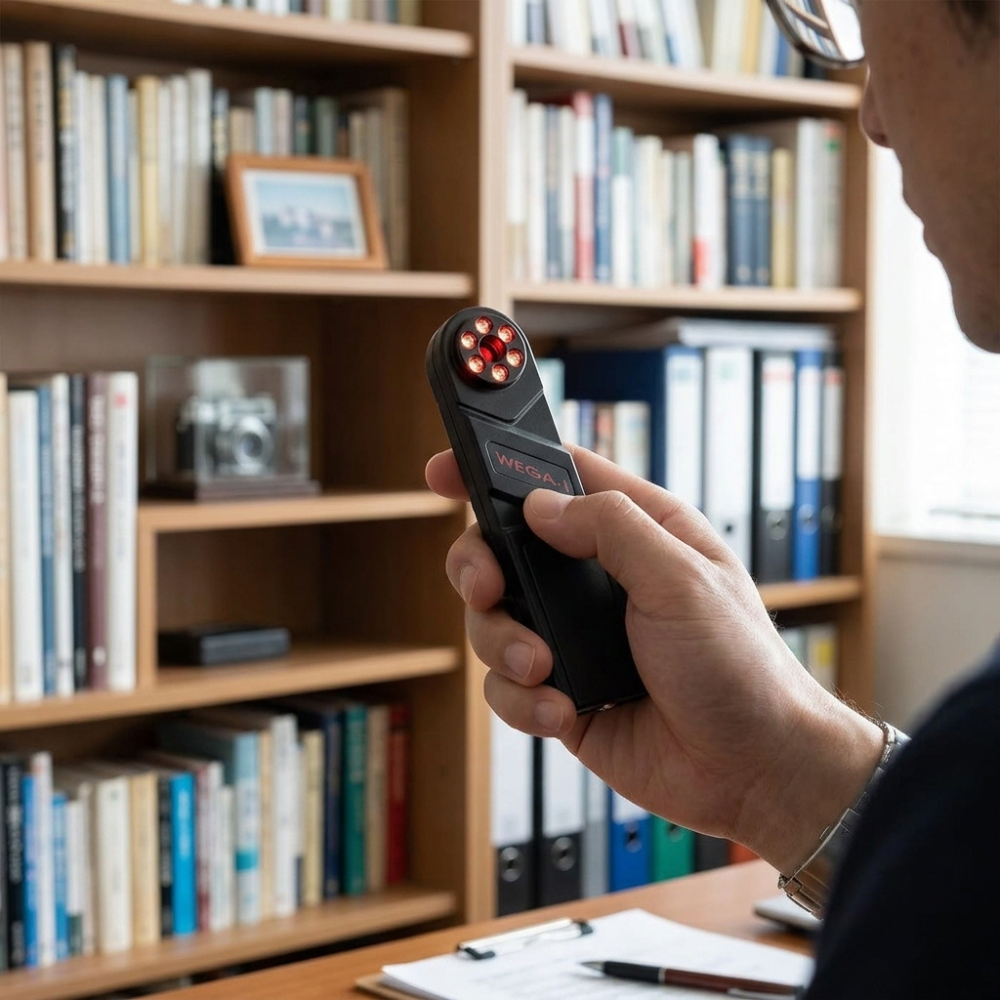
The WEGA-i hidden camera detector from Digiscan Labs works on the same principle as the RD-30's optical mode, but as a purpose-built instrument rather than a secondary function. The difference shows up in three places.
Detection distance: 2 to 10 metres
Double the RD-30's practical reach. A more powerful LED matrix is what buys you that range, and in practice it is the difference between scanning a boardroom from one position and walking the perimeter twice.
An infrared filter that rejects natural reflections
People underestimate this one until they have done a real sweep.
Every polished surface in a room returns light. Mirrors, glass, chrome fittings, screw heads, picture frames. On a basic optical detector, all of them look like candidate lenses, and you spend the evening chasing them until you stop trusting the device. The WEGA-i has built-in infrared filtering glass that suppresses those surface reflections, so what remains is far more likely to be an actual lens.
Adjustable radiation power
The RD-30 has one brightness setting. The WEGA-i lets you raise and lower the output, with a bar graph showing the current level. Drop it for close surfaces at one to three metres, raise it beyond five. A fixed output either washes out what is near you or fades out at the far end of the room.
What does not change
The WEGA-i finds cameras regardless of operating state. Active, standby, transmitting, recording locally to an SD card, or switched off entirely, the lens reflects either way.
It runs on 2 x AAA batteries, measures 140 x 34 x 16 mm and weighs almost nothing, so it does not change how you travel.
Of everything on this page, the WEGA-i is the one we point people towards most frequently. The reason has less to do with the device than with what people are actually worried about.
When someone contacts us about surveillance for the first time, the concern is usually a camera. A rental property or a hotel, or an office they have just moved into. Audio surveillance is the more serious corporate threat, but cameras are what most first-time buyers have in mind.
The part that is not a matter of opinion
We always say that a camera recording to an SD card transmits nothing; there is no signal.
There is no sensitivity setting, no antenna that changes this, because there is no emission to find. Optical detection is the only method that works, and it works because a lens returns light whether or not the device behind it is powered. That is why WEGA-i is so valuable when cameras are the stated concern.
What experience adds to the specification
The spec sheet gives you 2 to 10 metres range to look out. It does not tell you that technique matters as much as range.
You have to work with the device; if you don't see anything or you are not sure, change your position and look again. A reflection from a metal fitting, a screw head or a pane of glass will shift or vanish as your angle changes, while a lens reflects along the same axis no matter where you stand. A point that holds steady through a change of position is worth a physical inspection.
Brightness works the same way. Most people leave it at maximum, which washes out close surfaces and produces exactly the false alarms the IR filter exists to prevent. Turn it down for anything within three metres.
For the longer technical comparison, including the professional-tier OPTIC-2 with its 0.5 to 50 metre range and binocular viewing, we set it out in optical bug detection 101: RD-30 vs WEGA-i vs OPTIC-2
If transmitting devices like GSM bugs are the concern rather than cameras, the upgrade comes down to two things: seeing higher frequencies and being able to tell what a signal actually is while keeping the device use-friendly for first-time buyers. Two units cover most of what people need:
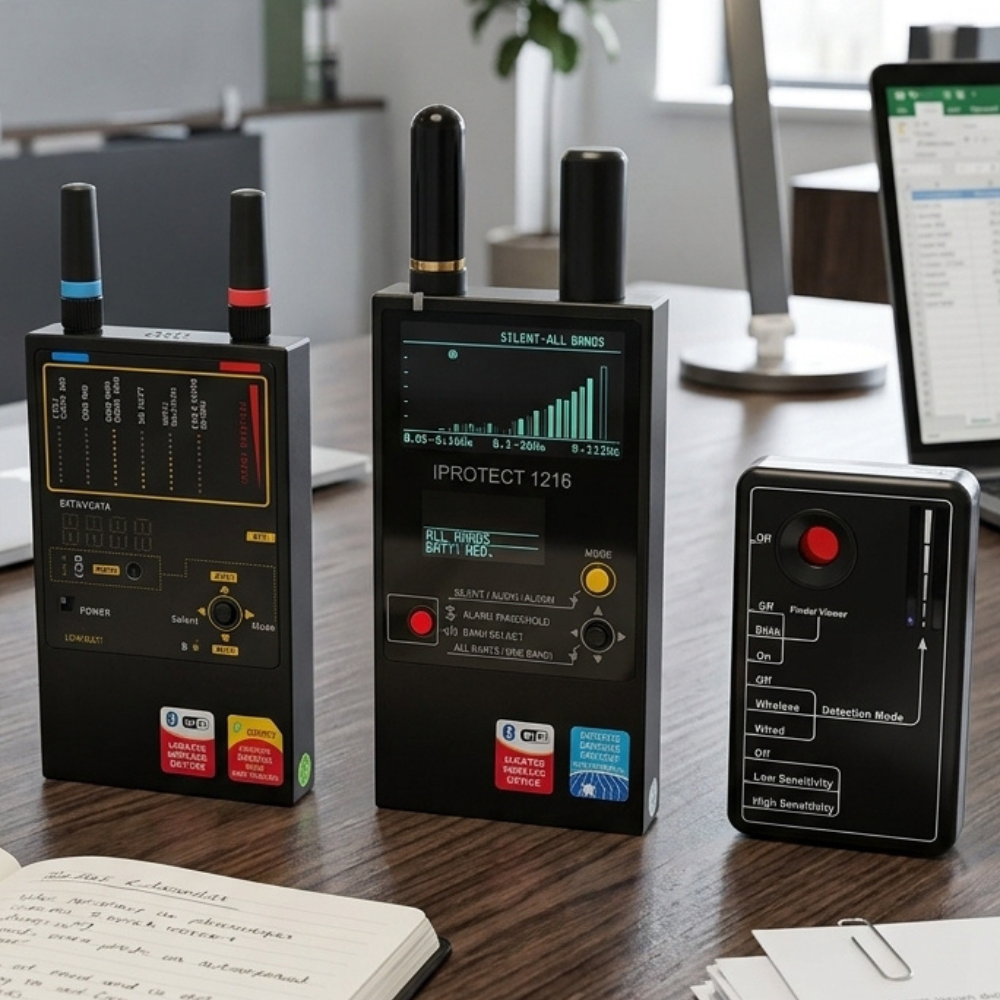
iProtect 1216: three bands up to 12 GHz
The iProtect 1216 is the most common step up from the RD-30. The reason is the third band.
| Band | Range | Covers |
|---|---|---|
| Band 1 | 50 to 700 MHz | VHF and UHF transmitters |
| Band 2 | 700 MHz to 3 GHz | Mobile and wireless |
| Band 3 | 3 to 12 GHz | Microwave, Wi-Fi at 5 GHz and above |
Band 3 is the one the RD-30 cannot reach, and it is where a growing share of covert devices now sit.
Each band appears separately as a bar graph, so several signals can be read at once.
Alongside it, a signal signature names the probable type: DECT idle, DECT active, GSM, 3G, or Wi-Fi and Bluetooth. The alarm threshold has 48 steps, which lets you set it above the room's normal RF floor so it only sounds on something genuinely out of place. It picks up Apple AirTags too.
Six hours on a rechargeable Li-Ion battery, 265 g, 1 to 10 metre range.
Protect 1207i: reading what a signal is, not just that it exists
The Protect 1207i takes the opposite approach. Instead of stretching the range, it concentrates on 800 to 7000 MHz, where the great majority of covert devices actually operate, and splits that span across six simultaneous channels with a bar graph each.
| Channel | Range | Covers |
|---|---|---|
| Channel 1 | 824 to 849 MHz | CDMA, LTE800 |
| Channel 2 | 880 to 920 MHz | GSM900 |
| Channel 3 | 1710 to 1790 MHz | GSM1800 |
| Channel 4 | 1920 to 2000 MHz | 3G, DECT, GSM1900 |
| Channel 5 | 2400 to 2480 MHz | Bluetooth, Wi-Fi |
| Channel 6 | 3000 to 7000 MHz | Wi-Fi 5.8 GHz, WiMax, 4G/LTE |
A reading now tells you which kind of device you are looking at.
Listen mode goes further and gives each transmission type its own audio signature, so for example Bluetooth crackles. Wi-Fi scratches. GSM buzzes. DECT hums like a transformer.
After a few sweeps, you can characterise a signal without looking at the screen at all.
It is also sensitive enough to catch a GSM or 3G device merely connected to a base station, with no call or data transfer in progress. That matters more than it sounds: it is exactly the state a planted GSM bug sits in while it waits to be dialled.
Four modes (Silent, Vibration, Visual, Listen), 10 to 15 hours on 2 x AAA batteries, 1 to 10 metre detection distance.
Most people who upgrade end up owning one of each, because the two methods cover different threats and neither substitutes for the other. If that is where you are heading, the Basic RF and Lens Detection Kit pairs both in one purchase, and we compare the kit tiers in detail in when and why to upgrade your counter-surveillance kit.
Equipment is roughly half of a useful check. Method is the other half, and method is what separates a sweep that means something from one that produces a false sense of security.
For a room you are checking yourself, four things matter:
SpyShopEurope is operated by Beling d.o.o. of Rijeka, Croatia, in business since 1990 and selling counter-surveillance equipment online since 2009. We supply LawMate, Digiscan Labs, REI, JJN Digital and other TSCM manufacturers to law enforcement, government and corporate security buyers across Europe. Every device described here is one we stock, ship, use ourselves and answer questions about. We do not write about equipment we do not carry.
SpyShopEurope operates in full compliance with relevant EU and international regulations. All items ship from within the EU with a 24-month warranty and a 14-day return period. Items on this website are not to be used for illegal surveillance of unsuspecting subjects, and are to be used only in compliance with all local laws and regulations.